Mileage Allowance Rates Have Increased: How to Update Your Settings in Light Blue
The Chancellor recently announced an increase to the HMRC mileage allowance rates for business travel using personal vehicles in the UK.
From the 2026/27 tax year, you can now claim tax relief on 55p per mile for the first 10,000 business miles (up from the previous rate of 45p per mile). The change was announced on 21 May and has been backdated to 6 April.
If you record mileage within Light Blue, there are two things you may want to do:
1. Find Existing Mileage Claims That Need Updating
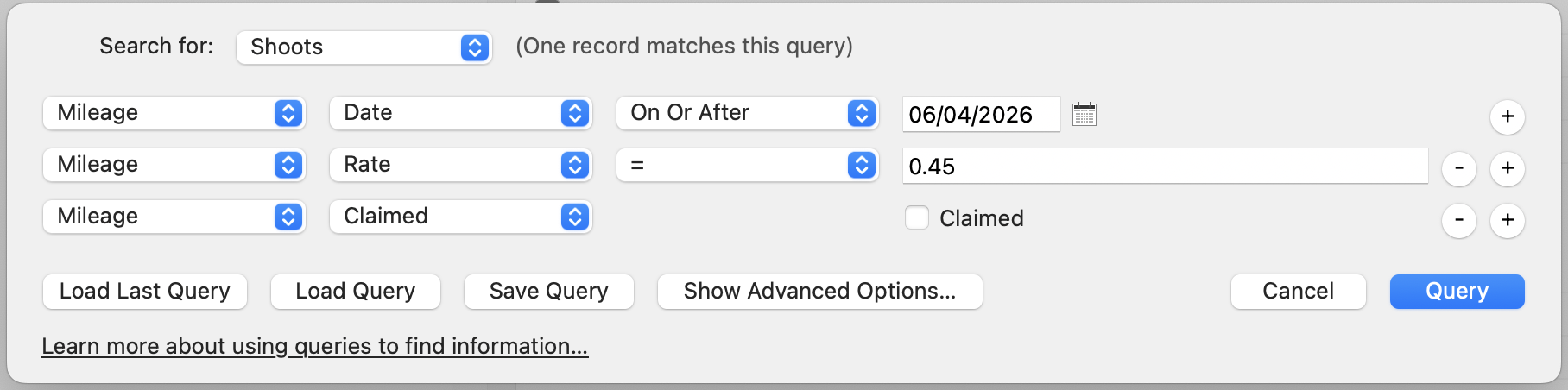
Because the change has been backdated, you may already have shoots or jobs with mileage recorded at the old rate.
You can use Light Blue’s Query tool to find any shoots containing mileage claims that may need updating. We’ve included an example query below that you can run to identify affected records.
2. Update Your Mileage Rate Going Forward
To update your default mileage rate in Light Blue:
- Open Preferences
- Go to the Finances section
- Click the General tab
- Update the mileage rate to 55p per mile
This will ensure future mileage claims use the updated rate automatically.
Learn More About Recording Mileage in Light Blue
Light Blue makes it easy to record and track business mileage for shoots, meetings, and other travel.
Learn more about recording mileage and expenses in Light Blue here
Related
- How Corporate Photographers Can Win More Annual Repeat Work with One Simple Workflow
- 7 tips for more successful in-person sales (IPS) sessions
- How to nurture enquiries on autopilot with Light Blue
- How to Manage Photography Client Expectations
- How To Attract Your Ideal Photography Clients
- Book more clients by phoning your leads - tips for making successful calls
- Using Sales Data to Drive Smart Upselling
- How to deal with difficult clients
- The Ultimate Guide to Selling Wedding Albums: Insights from Folio Albums and How Light Blue CRM Can Boost Your Sales
- How to Find a Consistent Photography Client Base