A better way to manage enquiries in Light Blue
One of the things we often talk about during our one-to-one training calls is how to get the most out of enquiries in Light Blue.
 “Recently, I was speaking to a customer who had been hesitant to add enquiries to Light Blue. Instead, they were only creating a shoot record once a client had actually booked.”
It’s an understandable approach, but it meant they didn’t have a clear overview of the opportunities they were working on, and it was easy for enquiries to get forgotten.
So, here’s our recommended approach:
If there’s a possibility of doing some work with a client, create a shoot record.
You don’t need to wait until the client has booked.
A shoot record can start life as an Enquiry, and you can then update its status as things progress:
Enquiry → Confirmed
Or, if the work isn’t going ahead:
Enquiry → Cancelled
And importantly, you don’t need to know the date of the shoot when you first create the enquiry. You can add the date later, once the booking has been confirmed.
Why create a shoot record for every enquiry?
There are several good reasons.
Keep track of every opportunity
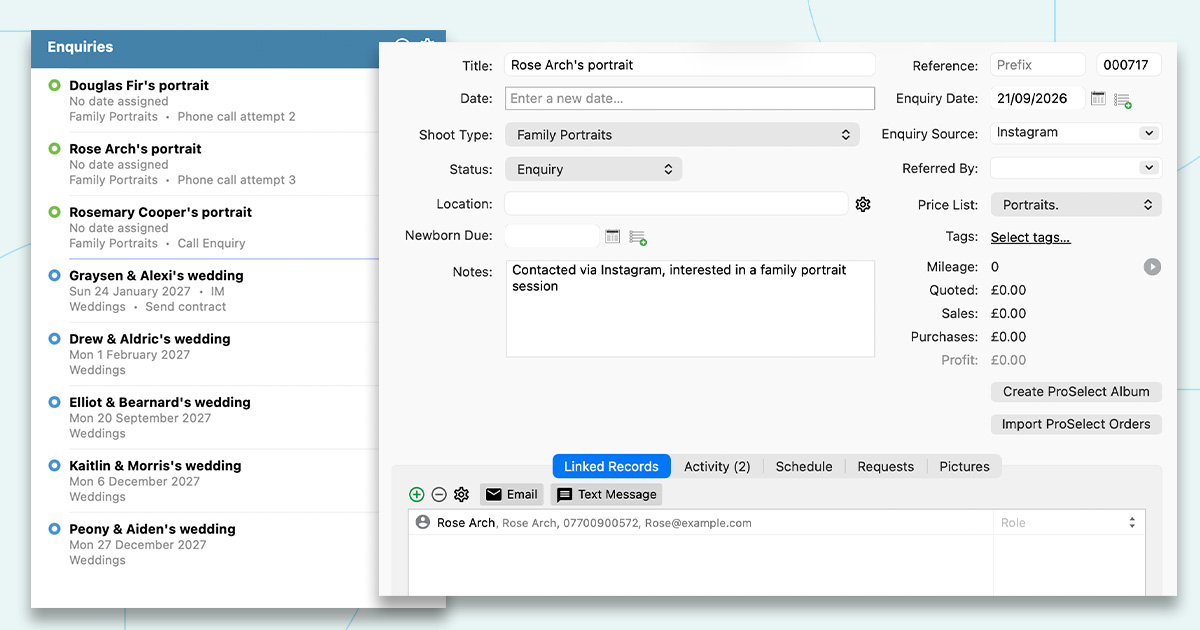
Creating a shoot record as soon as someone gets in touch gives you a record of the enquiry and means you can see what’s currently happening with your potential bookings.
Rather than relying on your inbox or memory to remember who got in touch, Light Blue gives you a central overview of the enquiries you’re working on.
See the history of your relationship with a client
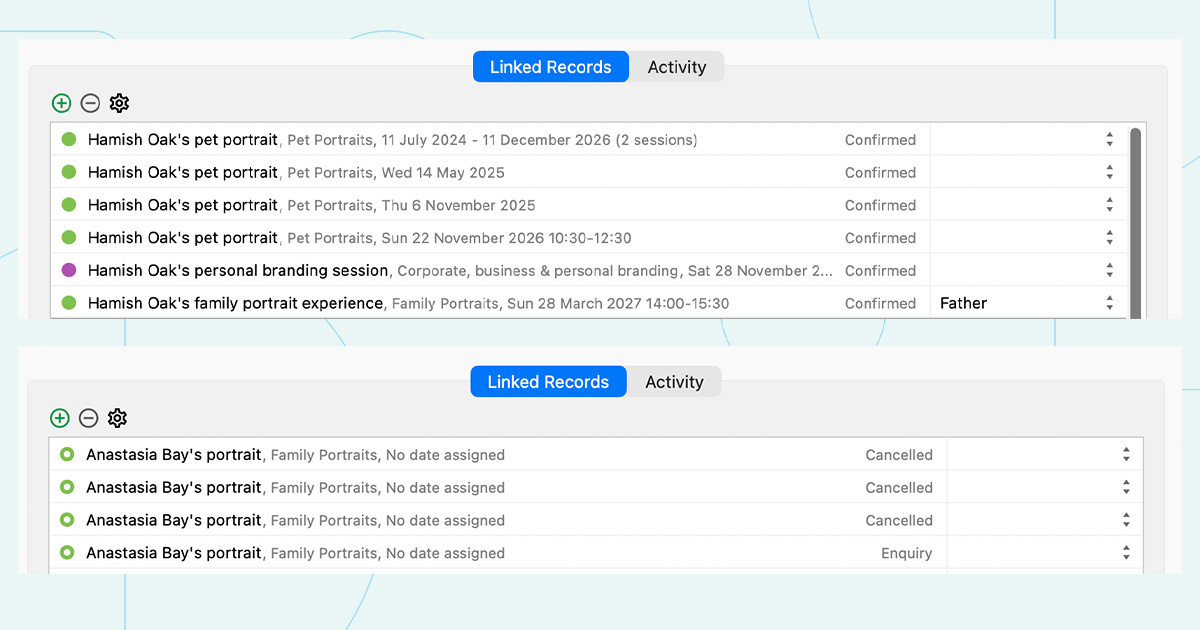
A single contact can be linked to multiple shoot records, and you can see the status of each one.
For example, you might discover that someone has contacted you three times over the last couple of years but has never actually booked. That’s useful information. You might want to approach that person differently from someone who has contacted you for the first time.
The shoot records help give you that bigger picture.
Understand which marketing is actually working
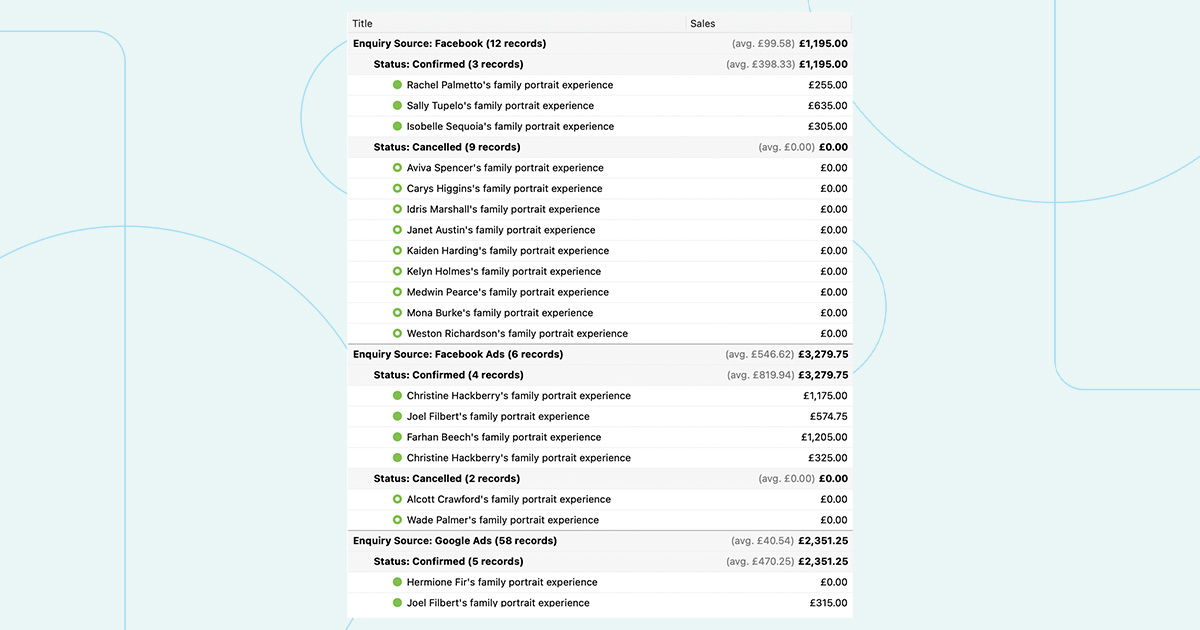
Shoot records also have an Enquiry Source field, allowing you to record how the client found you.
This becomes much more useful when you record every enquiry, rather than just the ones that turn into bookings.
You can then see things like:
- Which marketing sources are generating the most enquiries?
- Which sources are generating enquiries that actually convert into bookings?
- Is there a source that brings in lots of enquiries but very few bookings?
- Are there sources that generate fewer enquiries but have a very high conversion rate?
If you only create shoot records for confirmed bookings, you’re missing half of this picture.
For example, you might think a particular marketing channel isn’t performing because it only resulted in a handful of bookings. But if it generated hundreds of enquiries, you have a very different story, and perhaps an opportunity to improve how those enquiries are converted.
Use enquiry workflows to help turn enquiries into bookings
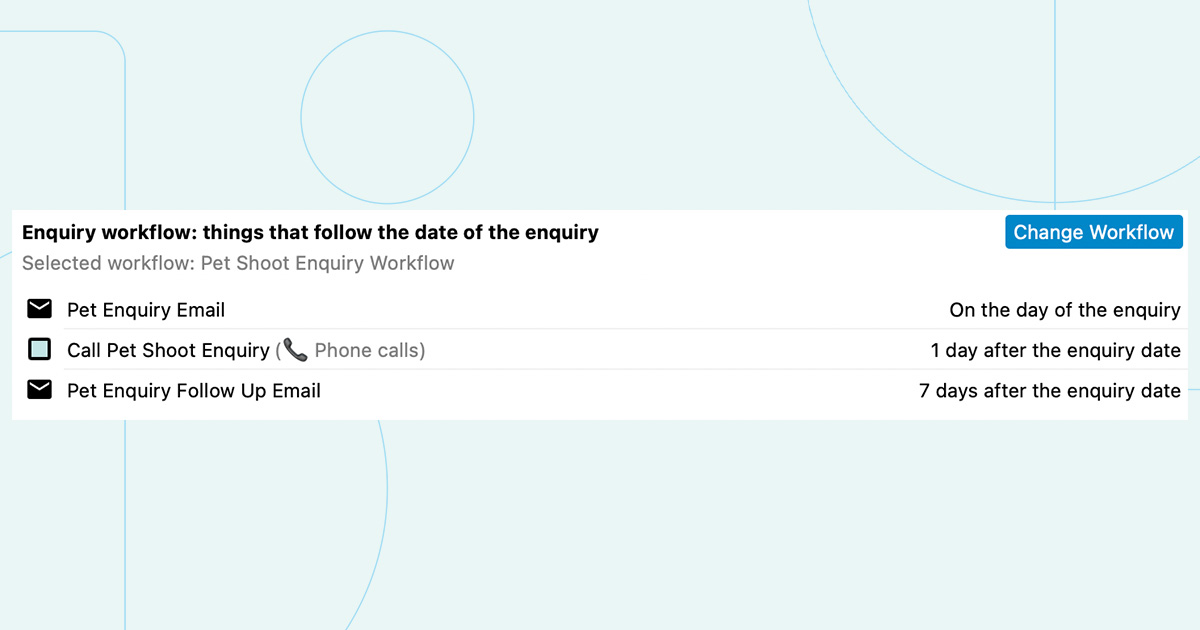
There’s another big advantage to creating a shoot record at the enquiry stage: you can use Light Blue’s enquiry workflows.
An enquiry workflow can automatically add things like tasks, emails, text messages and proposals to help you follow up with a potential client and guide them towards booking.
This means you don’t have to remember to do everything manually.
And once the shoot is marked as Confirmed, any outstanding items in the enquiry workflow are automatically removed.
So your workflow can effectively take care of the follow-up while an enquiry is still an enquiry, and then get out of the way once the booking is confirmed.
A simple change that can make a big difference
If you’re currently only creating shoot records once someone has booked, try creating them as soon as there’s a genuine possibility of doing some work with that client.
You don’t need all the details yet. You don’t even need a date.
Just create the shoot record, set its status to Enquiry, record where the enquiry came from, and let Light Blue help you manage what happens next.
That gives you a much clearer picture of your pipeline, a better understanding of your clients, and more useful information about which parts of your marketing are working.
And, perhaps most importantly, it makes it much harder for a promising enquiry to simply get forgotten.
Want to learn more?
Here are a few useful guides to help you make the most of enquiries in Light Blue:
- Enquiry workflows: learn how to automate your follow-up and keep potential clients moving towards a booking.
- Scheduling calendars: see how your calendars can be used to allow an open enquiry to be confirmed and scheduled.
- Sending proposals: learn how proposals can be sent to clients and used as part of the booking process.
Related
- How Corporate Photographers Can Win More Annual Repeat Work with One Simple Workflow
- 7 tips for more successful in-person sales (IPS) sessions
- How to Build Long-Term Relationships With Your Portrait Clients
- Which of your shoot locations brings in the most revenue? Here’s how to find out with Light Blue.
- A Smart Way to Compare This Year’s Sales with Last Year’s (Up to This Point)
- Print a Handy Summary of Your Shoot Record with Just One Click
- Present Contracts In-Person with Your iPad or Tablet
- Using Custom Fields to Forecast Portrait Session Sales
- Keep All Client Messages in One Place with a Custom Dashboard
- Two-way text messaging in Light Blue