Search for answers or browse our knowledge base.
Can't find the answer you need here? Contact our support team and we'll gladly help you.
Public Proposals
Public proposals allow you to use Light Blue’s powerful proposal system with new clients before they’ve contacted you or been added to Light Blue.
Unlike a standard proposal, which is published from an existing shoot record, a public proposal can be shared publicly on your website, in marketing campaigns, or anywhere else you’d like potential clients to be able to access it.
This allows clients to build their own quote, select packages and add-ons, and optionally complete forms, sign contracts, schedule sessions, and make payments without you needing to create a shoot record first.
How public proposals work
Just like regular proposals, public proposals are created using proposal templates.
A proposal template defines everything that will be included in the proposal, including:
- Packages
- Optional add-ons
- Images and text content
- Forms
- Contracts
- Scheduling calendars
- Booking fees
- Payment schedules
If you haven’t already created a proposal template, see our help article on creating proposal templates.
Unlike regular proposals, public proposals aren’t published from a shoot record. Instead, they can be completed by anyone who has access to the proposal link or embedded form.
When a client completes a public proposal, Light Blue creates a new shoot record automatically.
Creating shoots from public proposals
Because public proposals create new shoots, Light Blue needs to know what type of shoot should be created.
There are two ways to do this:
Option 1: Use a scheduling calendar
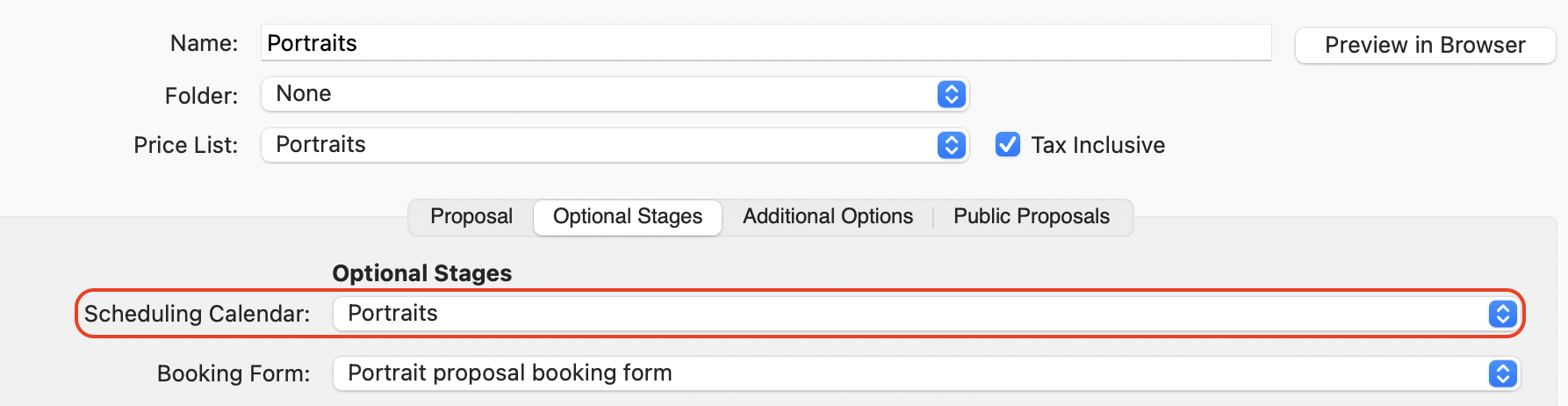
If your proposal includes a scheduling calendar that creates shoots, Light Blue will use the shoot type configured within that calendar when the client books their session.
This is often the best option when clients need to choose a date and time for their booking.
Option 2: Specify a shoot type
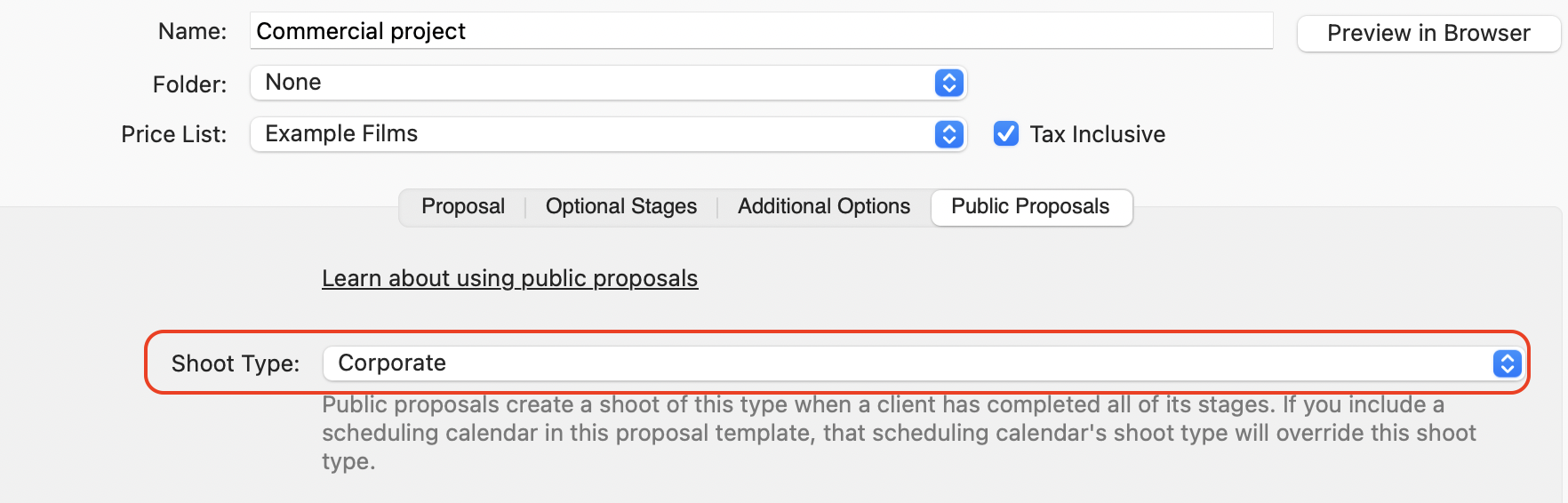
If your proposal doesn’t include a scheduling calendar, you’ll need to specify a shoot type for the proposal.
This tells Light Blue what type of shoot record should be created when the proposal is completed.
If neither of these options is configured, Light Blue won’t know what type of shoot to create.
Confirmed or unconfirmed shoots
By default, proposals create confirmed shoots when they’re completed.
If you’d prefer enquiries created from public proposals to remain unconfirmed until you’ve reviewed them, you can change this in your proposal settings.
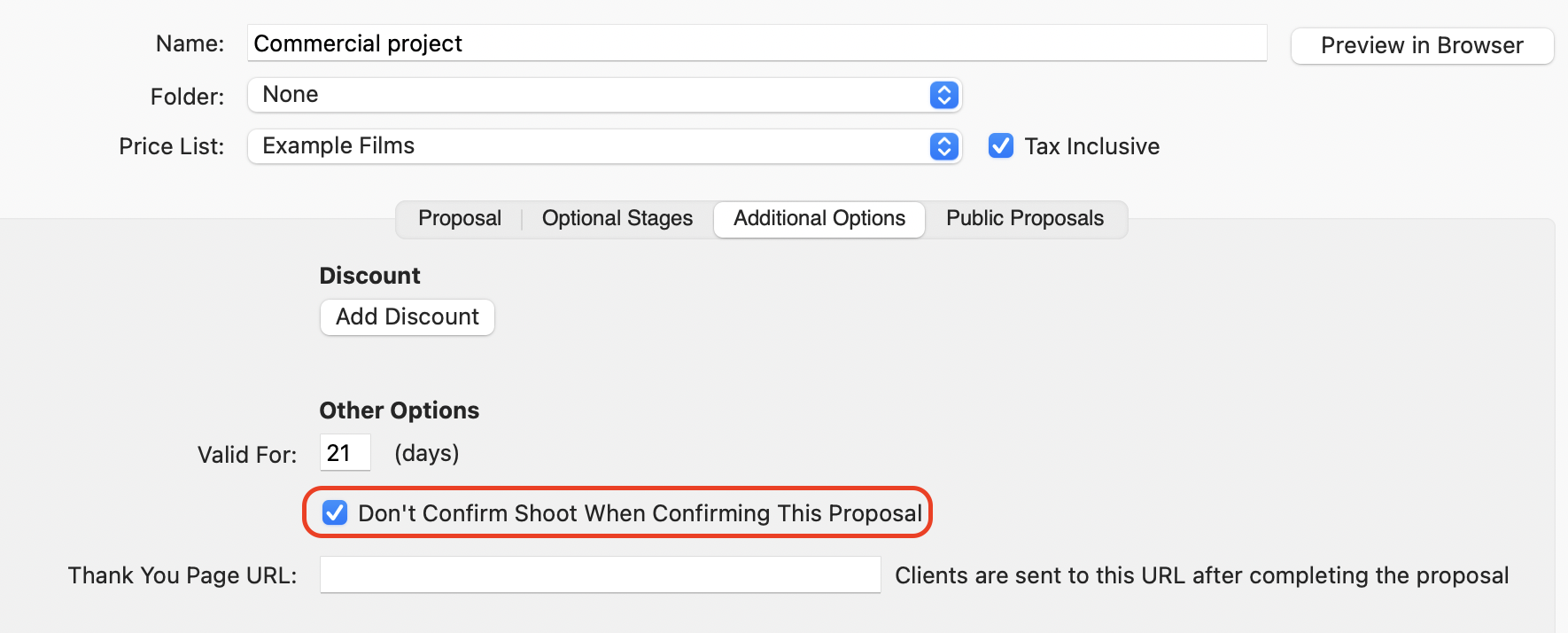
This can be particularly useful for enquiries where availability or pricing may need to be confirmed before accepting the booking.
Sharing a public proposal
To share a public proposal:
- Open the proposal template.
- Go to the Public Proposals tab.
You can then choose one of two options:
Embed the proposal on your website
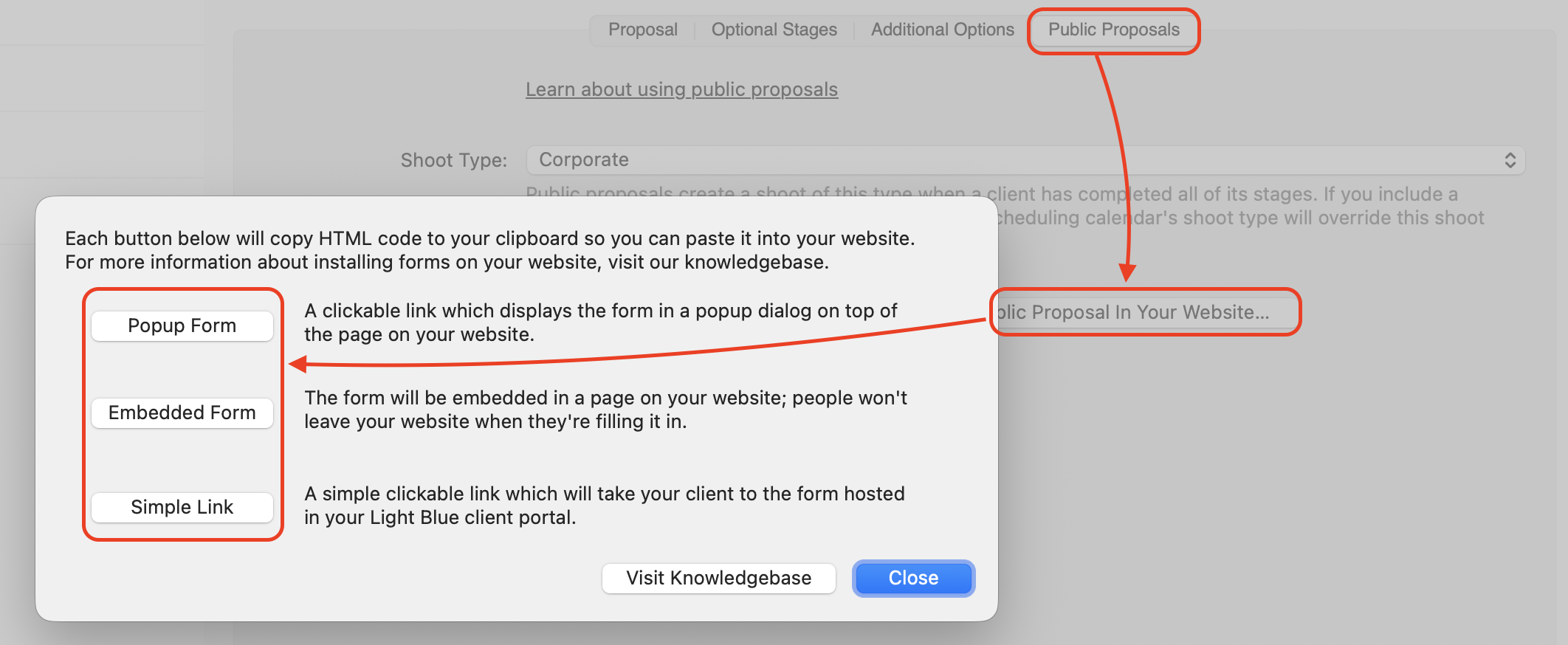
Click Install Public Proposal In Your Website to copy the HTML code needed to embed the proposal directly into your website.
This allows clients to complete the proposal without leaving your site.
Share a direct link
Click Open Public Proposal In Browser.

This opens the public proposal in your web browser. You can then copy the URL and share it wherever you’d like, including:
- Email campaigns
- Social media posts
- Online advertising
- QR codes
- Website buttons and links
How public proposals differ from regular proposals
Public proposals and regular proposals use the same proposal template system and support the same booking features.
However, there are a few important differences:
Public proposals
- Available to anyone with the link
- Used to generate new enquiries or bookings
- Do not use published or reminder emails
- Do not have an expiry date*
- Create a new shoot record when completed
Regular proposals
- Published from an existing shoot
- Used to confirm an existing enquiry or booking
- Can use published and reminder emails
- Have an expiry date*
- Associated with an existing shoot record
* Proposal expiry dates
Unlike regular proposals, public proposals don’t expire after a set number of days. A public proposal remains available indefinitely, allowing new clients to access it whenever they need to. The only time limit applies while someone is in the process of completing it: progress between stages is temporarily stored for 15 minutes. If the proposal is left incomplete for longer than that, the saved progress expires and is discarded, although the public proposal itself remains available to be completed again from the beginning.
Ideas for using public proposals
Public proposals can be adapted to a wide range of photography businesses and workflows.
Corporate photography quotations
Allow clients to provide details about their project and build a quote based on the services, coverage, and options they require.
This can help clients self-serve while still giving you all the information you need to review the project.
Portrait session bookings
Use a public proposal as the destination for a marketing campaign.
Clients can select a package, choose any optional upgrades, complete any required forms, pay a booking fee, and schedule their session in a single process.
Voucher sales
Sell gift vouchers directly through a public proposal.
Clients can choose the voucher they’d like to purchase, enter their details, and make payment without any manual administration.
Wedding enquiries
If your pricing is already available on your website, a public proposal can allow couples to build their preferred package while making their enquiry.
This gives you a clearer picture of the services they’re interested in before you respond and can help streamline your consultation process.
Mini sessions and seasonal promotions
Public proposals work particularly well for limited-time offers and mini-session events.
Clients can choose a package, book an available time slot, complete any required paperwork, and secure their booking immediately.
Learn more about proposals
- Overview of Proposals
- How to Set Up a Proposal Template
- Sending & Receiving A Proposal
- Public proposals – a proposal that can be shared publicly on your website, in marketing campaigns
- Proposal Booking Fee & Invoice Options
- Packages, Add-Ons & Summary Blocks in Your Proposal
- Styling Options for Proposal Blocks