Blog
How to nurture enquiries on autopilot with Light Blue
28/05/2026
If you’re getting a healthy number of enquiries, one of the biggest challenges isn’t necessarily getting leads, it’s consistently following up with them. People get distracted. They mean to reply later. They want to check dates with a partner. They forget to go back to your email. And when you’re busy shooting, editing, or managing […]
Read More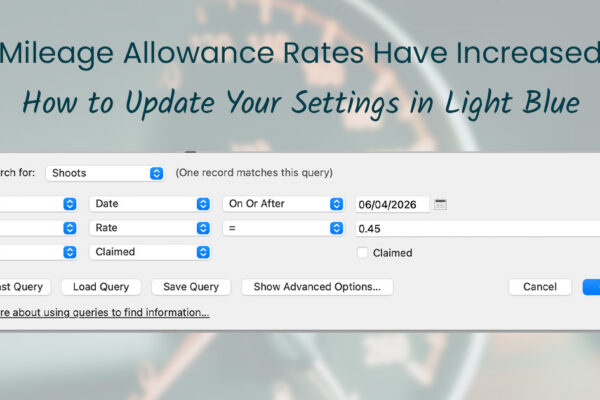
Mileage Allowance Rates Have Increased: How to Update Your Settings in Light Blue
28/05/2026
The Chancellor recently announced an increase to the HMRC mileage allowance rates for business travel using personal vehicles in the UK. From the 2026/27 tax year, you can now claim tax relief on 55p per mile for the first 10,000 business miles (up from the previous rate of 45p per mile). The change was announced […]
Read More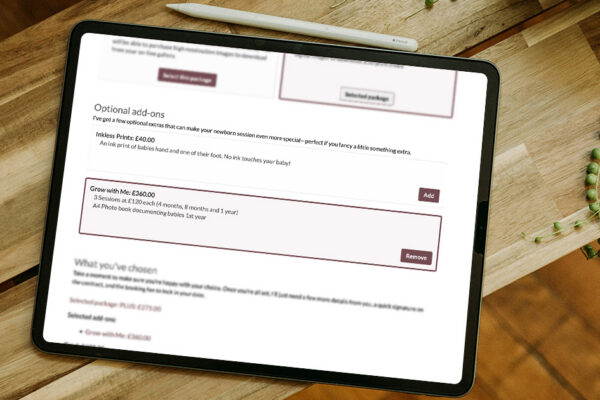
How Jenny Increased Sales and Simplified Her Workflow with Proposals
16/04/2026
For many photographers, selling packages, add-ons, and upgrades can feel clunky. It often relies on follow-up emails, phone calls, or trying to revisit the conversation later when the moment has already passed. For Jenny, a Family, Wedding & Brand Photographer based in Perthshire & Stirling, that’s exactly how things used to work. Now, with proposals […]
Read MorePlanned maintenance
10/04/2026
We’re going to be upgrading some of our infrastructure on Tuesday 14 April. This will involve a short interruption to our online services. The interruption should only last a few minutes, but we’re scheduling this work for 07:00-07:30 BST to minimise its impact. The Light Blue desktop and mobile apps will continue to work normally […]
Read More
Light Blue 2026.1 prerelease testing
30/03/2026
We’re currently prerelease testing Light Blue 2026.1, the next major update to Light Blue. Our initial testing has gone well, so we’re going to be adding more prerelease testers over the coming weeks; keep reading to learn how you can get early access. Here are some of the biggest new features that our subscribers can […]
Read MoreTimezone support added to scheduling calendars
13/02/2026
Light Blue’s scheduling calendars are really popular because they allow clients to book a shoot or appointment with you simply by selecting an available time and filling out their details in a booking form. They’re highly customisable and include features like booking fees, customisable booking forms, contracts, and integration with your Zoom account for automatically […]
Read MoreLight Blue 2025.1.4 release notes
09/02/2026
We’ve just released Light Blue 2025.1.4, which is a minor update that adds new features and fixes bugs reported since we launched Light Blue 2025.1. It includes the following changes:
Read More
Christmas & New Year support
19/12/2025
We’re still here to help over the festive season, but we’re also going to be taking a bit of a break so won’t be answering emails quite as quickly as normal between Christmas and New Year: Wishing you all the best, Tom & the Light Blue team
Read MoreLight Blue 2025.1.3 release notes
15/12/2025
We’ve just released Light Blue 2025.1.3, which is a minor update that adds new features and fixes bugs reported since we launched Light Blue 2025.1. It includes the following changes:
Read MoreLight Blue 2025.1.2 release notes
10/11/2025
We’ve just released Light Blue 2025.1.2, which is a minor update that adds new features and fixes bugs reported since we launched Light Blue 2025.1. It includes the following changes:
Read MoreScheduled website maintenance
31/10/2025
We’re going to be carrying out some scheduled maintenance on our website servers this weekend, which is going to lead to some unavoidable downtime for our account management pages and support resources such as our knowledgebase. However, Light Blue’s online services will be unaffected and you will be able to carry on using all of […]
Read MoreUpdated mobile apps with new proposals and documents features
24/09/2025
With all of the excitement about Light Blue 2025.1 and our new proposals features, you might not have noticed your phone automatically updating to the latest version of the Light Blue mobile app. On iOS, iPadOS, and Android, our mobile app now allows you to use proposal templates created in our desktop app to quickly […]
Read MoreLight Blue 2025.1.1 release notes
24/09/2025
We’ve just released Light Blue 2025.1.1, which is a minor update that adds new features and fixes bugs reported since we launched Light Blue 2025.1. It includes the following changes:
Read MoreNew Zapier actions open up new automation options
23/09/2025
Light Blue’s Zapier integration allows you to build time-saving automations that can connect Light Blue to thousands of other apps and services. For example, you can link Light Blue to any of the accounting apps that have a Zapier integration, or leverage a powerful email marketing app while keeping Light Blue at the heart of […]
Read MoreLight Blue compatibility with macOS 26 Tahoe and iOS 26
09/09/2025
Next week, Apple are going to be releasing major upgrades to macOS and iOS. iOS 26 and macOS 26 Tahoe are going to be released on 15 September. We’ve been testing the current versions of our macOS and iOS apps on the prerelease versions of macOS 26 and iOS 26 and haven’t found any issues. […]
Read More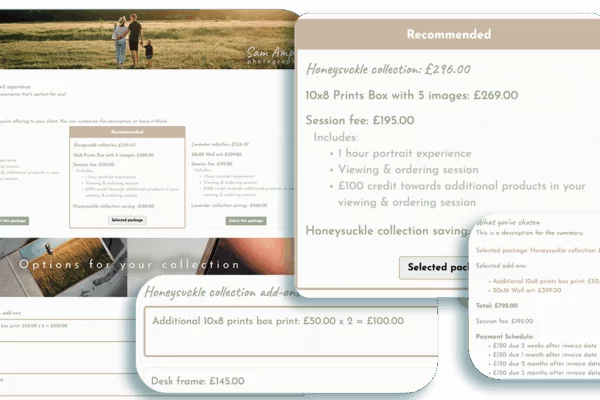
Light Blue 2025.1
09/09/2025
We’re pleased to announce a new update that improves your clients’ booking experience, along with dozens of other new features and improvements. Everything You Need to Book Clients, in One Easy Proposal Light Blue’s proposals let clients build their own quote by selecting a package and optional add-ons, creating a more interactive booking experience. This makes […]
Read MoreLight Blue 2025.1 release notes
09/09/2025
Light Blue 2025.1 is a major update that adds a major new proposals feature that improves your clients’ booking experience. Proposals Light Blue’s new proposals feature lets clients build their own quote by selecting a package and optional add-ons, creating a more interactive booking experience. This makes it easier to upsell additional products and services […]
Read More
How to Build Long-Term Relationships With Your Portrait Clients
12/06/2025
Portrait photography is deeply personal. Whether it’s traditional corporate head-shots, special family anniversary shoots or a candid lifestyle session, every client will want to be 100% comfortable with the results. It’s your job to make them so thrilled with those images they’ll come back for more. And tell everyone they know what a fabulous photography […]
Read More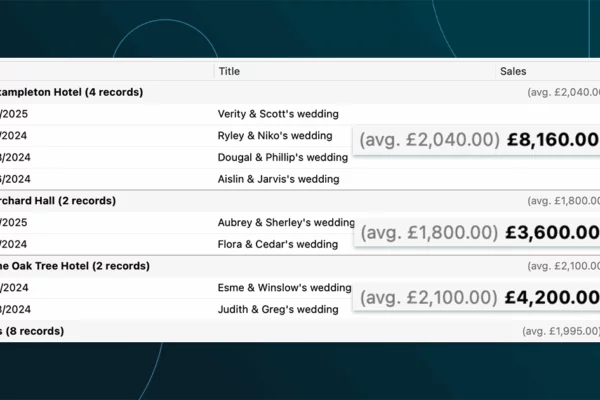
Which of your shoot locations brings in the most revenue? Here’s how to find out with Light Blue.
12/06/2025
We recently had a great question land in our support inbox from David, a portrait photographer who works in a variety of locations: “I’m trying to run a query to see which location has generated the most income in 2024.” It’s exactly the kind of smart, business-focused question we love to help with – because […]
Read More
How to Manage Photography Client Expectations
16/04/2025
Your photography clients will have expectations – plenty of them. And it’s part of your job to manage them, meet them and even exceed them. Here we’ll explore how to avoid potential client disappointment every step of the way. Setting the Stage Before a contract is signed, make sure your ‘expect expectations’ mindset is in […]
Read More
A Smart Way to Compare This Year’s Sales with Last Year’s (Up to This Point)
15/04/2025
Bruno, one of our lovely Light Blue customers, got in touch with a really good question: “How can I compare my sales so far this year to the same point last year?” It’s a great one and it’s exactly the kind of insight that helps you understand how your business is really doing. Why it […]
Read MoreCase Study: How Nick Uses Light Blue To Run a Smarter, More Confident Event Photography Business
15/04/2025
Nick runs a thriving event photography agency based in London, working primarily with corporate clients. From conferences and awards ceremonies to headshots and PR shoots, no two days are the same – which is exactly how he likes it. “Every day is different. I’m learning about some niche business I’d never heard of before. Even […]
Read More
Print a Handy Summary of Your Shoot Record with Just One Click
21/03/2025
Did you know that you can print a detailed summary of your shoot record straight from Light Blue? This simple but powerful feature gives you all the key details you need at a glance, making it a great tool for staying organised on the day of a shoot. By clicking the Print/Send button on a […]
Read More
Present Contracts In-Person with Your iPad or Tablet
19/03/2025
Streamline your contract signing process by presenting contracts to your clients in person using the Light Blue mobile app. This approach is ideal for client meetings, giving you a more personal touch when finalising bookings. Instead of sending contracts via email, you can walk clients through the details, answer any questions on the spot, and […]
Read More